Ragdoll Destruction Playground Weapons, Explosives, Fire, and Props
Practical tool breakdown for Harpax Dev's sandbox �?from minigun spray to chainsaw contact and blast-driven set pieces.
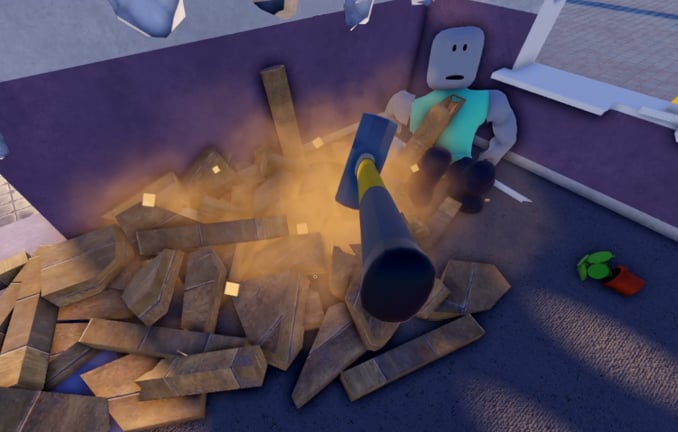
Weapons in Ragdoll Destruction Playground exist to stress the physics sandbox: intelligent ragdolls, breakable props, fire, and chain reactions. The standout kit from recent updates includes a minigun, a chainsaw, explosives, extra props, and unlockable items, with NPC behaviours reacting to the chaos. This guide explains how those tools feel, how they interact, and how to combine them without turning every session into unreadable debris.
New players should skim Getting Started and Controls first so tool switching and reset habits are already in place.
Minigun: sustained force and spray learning
The minigun is the sandbox’s volume tool. Use it to:
- Learn how ragdolls absorb continuous hits versus single impacts
- Push props across the floor or knock stacked objects into collapse
- Soften a target before a melee finish or explosive punchline
Fire in controlled bursts at first. Full-auto spray looks impressive, but short bursts teach you when limbs go limp, when NPCs panic, and when you are wasting shots into empty air. Strafe while firing so you practice tracking moving ragdolls. If the scene fills with debris or visual noise, plan a map reset before the next experiment.
Combo seed: minigun stagger into a short chainsaw rush, or minigun to herd ragdolls toward a pre-placed explosive.
Chainsaw: contact, follow-through, and close reads
The chainsaw rewards positioning. You must close distance, keep the tool on target, and watch how ragdolls and props separate under continuous contact. It is ideal when you want to:
- Study close-range physics without waiting on a long reload fantasy
- Carve through prop clusters that bullets only chip
- Create chase moments that look great under slow motion
Approach from an angle that keeps the camera clear. Back off if fire or an armed explosive is already cooking nearby �?melee inside your own blast is a common beginner mistake. After a long chase, reset if bodies and props form a pile you cannot parse.
Combo seed: chainsaw pressure to pin a ragdoll against a prop wall, then disengage and finish with an explosive for a wide camera shot.
Explosives: radius, timing, and set dressing
Explosives are the punctuation mark of the sandbox. They create radius damage, launch ragdolls, shatter props, and often seed fire. Treat them as planned events:
- Clear a sightline and decide where you want debris to travel.
- Place or throw the explosive with room to step back.
- Optionally enable slow motion a beat before detonation.
- Watch secondary effects �?burning props, NPC flee behaviour, collapsing stacks.
- Reset when leftover fire or rubble blocks the next idea.
Stacking too many explosives at once can look loud but teach you nothing. Run single-charge tests to learn radius, then add a second charge only when you understand the first. Use props as cover or trampolines: barrels, crates, and other destructibles change how blasts read on camera.
Fire: the lingering multiplier
Fire is not just an orange particle. It lingers, spreads across props, and changes how you move through a scene. After an explosive or fire-enabled tool, ask:
- Is the fire still spreading toward an area you need to stand in?
- Are NPCs reacting to heat differently than to bullets?
- Will a chainsaw chase through burning debris look good or just obscure the camera?
Sometimes the best play is to let fire finish its job under slow motion, then reset. Fighting a burning map for ten more minutes often yields worse clips than a clean second take.
Props and unlockables as co-stars
Props are not decoration. They are mass, cover, and chain-reaction fuel. Unlockable items expand the kit over time �?new weapons, gadgets, or toys that change how you stage a wreck. Mindset tips:
- Learn default tools deeply before judging a new unlock.
- Place props deliberately: a stack for collapse, a clear lane for minigun tracking, a gap for explosive throw arcs.
- Recheck unlock panels after patches; early-access sandboxes add toys in waves. Track those waves on the Updates Hub and the Minigun + Chainsaw Update notes, then compare favorites on the Tier List Hub or Weapons Tier List.
NPC behaviours matter here too. Intelligent ragdolls that idle, flee, or react to explosions make weapons feel different than static dummies. Watch them for a few seconds before you open fire so your first shot tests a behaviour, not only a hitbox.
Combo ideas that stay readable
Try these structured set pieces, resetting between each:
- Stagger and carve �?minigun bursts to destabilize, chainsaw to finish, no explosives.
- Herd and boom �?minigun pressure toward a parked explosive, slow motion on detonation.
- Prop collapse �?weaken a stacked prop pile with bullets, then one explosive for the collapse shot.
- Fire frame �?single explosive, let fire spread under slow motion, do not add more tools until you have watched the burn.
- Unlock showcase �?equip one new unlockable, repeat combo 1 or 2, note what changed versus defaults.
- Lane clear �?build a prop corridor, minigun the length of it, reset, then try the same lane with a chainsaw walkthrough.
- Safe distance boom �?mark a stand point, throw one explosive, confirm you never step into the radius while learning blast size.
Keep a simple scorecard: Did I see the ragdoll reaction? Did fire help or obscure? Did I need a reset sooner?
Ranking mindset without a campaign
There is no raid boss to clear. “Best weapon” depends on the scene. A chainsaw that feels average on an empty floor can steal the show in a dense prop forest. Explosives win pure spectacle; the minigun wins area pressure; fire wins lingering drama. Use the Tier List Hub and Weapons Tier List as conversation starters, then write your own notes after ten clean resets.
Session hygiene and progression
Weapons shine when the map is clean. Alternate short destructive peaks with resets. Redeem anything useful from the Codes Hub before a long tool-testing session so unlockables are available while you compare kits. Optional script tools on Scripts are unrelated to learning intended weapon feel �?master the sandbox loop first.
Bad habits that waste sessions:
- Standing inside your own blast radius
- Hoarding debris until the client stutters
- Switching tools mid-swing without a plan
- Ignoring patch notes when new weapons arrive (Updates Hub)
When you are ready for cinematic timing, pair this page with Slow Motion. When debris piles up, lean on Map Reset. For a full index of tutorials, return to the Guides Hub. Community context lives on Players; official destinations on Links.
The goal is not maximum noise per minute. It is understanding how minigun, chainsaw, explosives, fire, and props each stress the physics �?then conducting those stresses on purpose until every wreck looks like a directed take instead of an accident.
Frequently Asked Questions
Quick answers to the most common questions.
Which weapon should I try first?
Start with the minigun for ranged feedback, then the chainsaw for contact physics, then a single explosive so you can learn blast radius without stacking chaos.
Do explosives always start fires?
Fire is a major feature of the destruction update wave, but exact behaviour can vary by tool and patch. Watch each detonation once under slow motion to see what lingers.
How do unlockables fit in?
Treat them as expansions on the core kit. Learn defaults first, then compare each unlock with the same combo routine so differences are obvious.
Why do my combos look messy on camera?
Too many tools at once, no slow motion on the climax, and no map reset between takes. Simplify to one combo, film it, then reset.
Where should I go after this guide?
Use Slow Motion for cinematic timing, Map Reset for cleanup flow, and the Tier List Hub when you want opinionated rankings.
Is the minigun better than the chainsaw?
Neither is universally better. Minigun wins at range and herd pressure; chainsaw wins in close prop-dense scenes. Test both on a reset map before you rank them.