Ragdoll Destruction Playground Unlockables and NPC Behaviour Lab
A methodical way to evaluate new items and reactive ragdolls while the early-access toybox keeps growing.
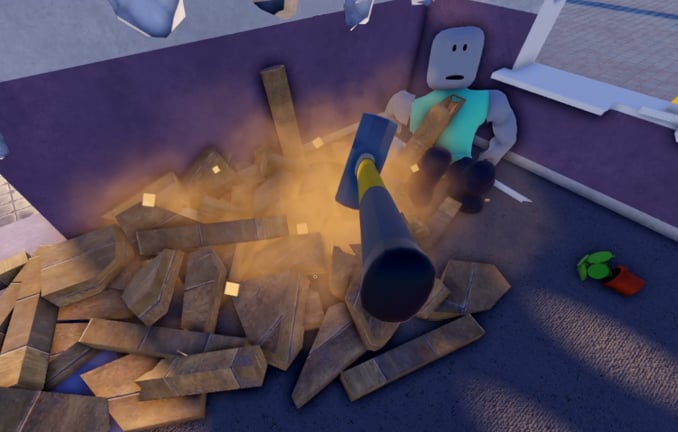
Harpax Dev’s official pitch for Ragdoll Destruction Playground calls out unlockable items and NPC behaviours beside the louder toys—Minigun, Chainsaw, Slow Motion, explosives, fire, and props. Those two systems are easy to ignore when you are busy detonating the map, yet they are how the sandbox stays interesting after the first hour. This guide teaches a lab mindset: unlock something (or find a new NPC reaction), isolate it, compare it fairly, then decide whether it belongs in your highlight reel.
Prerequisites: Getting Started, Weapons and Explosives, Slow Motion, and Map Reset. Opinionated ranks live on the Weapons Tier List.
Unlockables mindset (not a spoiler dump)
Early-access unlock tables change. This wiki will not invent a fake checklist of every hidden prop just to look complete. Instead, treat unlockables as new verbs:
- A new ranged toy changes how you open a scene
- A new melee or tool changes how you finish a scene
- A new prop or gadget changes how you stage cascades
- A cosmetic or novelty item changes how clips read on camera
When something new appears in your tray or world after a patch, do not immediately dump it into a five-explosive stack. Run a controlled test first.
Five-step unlock evaluation
- Reset the map so leftover fire and debris cannot fake a “buff.”
- Name the question out loud: “Does this item stagger NPCs faster than the minigun?” or “Does this prop seed fire more reliably?”
- One variable only—same camera distance, same slow-motion timing, same explosive count as your baseline.
- Record or mentally note what the unlock changed: speed, radius, ragdoll flail, prop launch, fire linger, noise, or readability.
- Reset again and either promote the item into a destruction combo or park it until the next patch.
That loop keeps unlock hunting from turning into unreadable chaos. It also produces feedback Harpax Dev can use—see Player Feedback.
NPC behaviour testing methodology
“Intelligent ragdolls” and NPC behaviours are only useful if you can see them. Full-speed spam hides panic, stumble, idle breaks, and recovery. Use this protocol:
Mild → medium → loud stimuli
On a clean map:
- Mild: Walk near an NPC or apply a light prop bump. Watch idle breaks and attention shifts.
- Medium: Short minigun burst or a gentle shove into a prop pile. Watch stagger and recovery.
- Loud: Single explosive at a safe distance, then optional slow motion as the blast blooms. Watch flee, tumble, fire reaction, and whether limbs stay readable.
- Melee finish: If anything remains in range, compare a chainsaw close with and without slow motion.
Never judge NPC “AI” during a debris storm. Reset between stimulus tiers. If two NPCs behave differently, note device performance too—mobile frame drops can look like “dumb” reactions.
What to write down
Useful lab notes look like:
- Device (PC / mobile)
- Stimulus used
- Slow motion on/off
- Distance to blast
- Whether the map was freshly reset
- What you expected vs what happened
Those notes transfer straight into quality reports on the Players Hub path.
Pairing unlockables with default toys
Defaults still matter. Unlockables are multipliers, not replacements:
- Minigun — Use as the control spray when judging a new ranged unlock.
- Chainsaw — Use as the control melee finish after softens from explosives.
- Explosives + fire — Best stress test for whether a new prop is flammable staging material.
- Slow motion — Best microscope for NPC flinch and unlock “feel.”
- Props — Build identical corridors or stacks so unlock comparisons share geometry.
Deep tool behaviour lives in Weapons and Explosives. Combo recipes that chain unlockables into set pieces live in Destruction Combos.
Session template (fifteen minutes)
- Reset map; confirm HUD and tray after any patch (Controls if binds feel off).
- Minutes 0–3: mild NPC observation, no weapons.
- Minutes 3–7: baseline minigun or explosive on the same NPC setup.
- Minutes 7–12: introduce one unlockable with identical staging.
- Minutes 12–15: slow-motion climax, then reset and jot notes.
Stop when the floor is unreadable. A shorter clean take beats a longer muddy one—especially while concurrent interest is high and you want clip-ready footage.
Video reference
The mid-article embed is a real Ragdoll Destruction Playground session by Alexandr Gellert (YouTube ID M5d2NSAXg-U). Use it as a visual sense-check for pacing and toy variety, not as a literal unlock walkthrough. Feature order in fan videos can differ from your live tray after patches.
Common mistakes
- Judging an unlock on a map that has not been reset since a firestorm
- Testing three new items at once so you cannot tell which one mattered
- Leaving slow motion on during the entire comparison (movement feel skews)
- Copying unlock rumors from a differently named ragdoll game
- Filing “NPCs broken” feedback without stimulus steps or device info
- Ignoring the tier list after a patch that clearly changed stagger rules
How unlockables fit early access
Visit counts for this place already sit around 1.5M+, which usually means more eyes on every new tray item. Harpax Dev can rearrange unlock pacing without warning. Recheck the Roblox description via Official Channels and skim Updates when something unfamiliar appears. Multiplayer is still planned—NPC crowd density and unlock sharing rules may change when sessions are no longer solo.
Next steps
- Build readable set pieces with Destruction Combos
- Keep reset discipline from Map Reset
- Re-rank tools on the Weapons Tier List after unlock waves
- Send structured notes through Player Feedback
Unlockables and NPCs reward curiosity with structure. Ask one question per reset, watch carefully under slow motion, and let the sandbox teach you what the new toy actually does.
Frequently Asked Questions
Quick answers to the most common questions.
Does this page list every unlockable item?
No. Early-access unlock tables change. The guide teaches a fair test method instead of a spoiler checklist that would go stale.
How should I test NPC behaviours?
Reset the map, apply mild then medium then loud stimuli, use slow motion for the loud beat, and write down device plus steps.
Which video is embedded here?
Alexandr Gellert's "Ragdoll Destruction Playground" video (YouTube ID M5d2NSAXg-U), used as a real-session reference.
Should I compare unlockables to the minigun and chainsaw?
Yes. Keep defaults as controls so you can tell whether the unlock changed openers, finishes, or only cosmetics.
Where do I report weird NPC reactions?
Follow the Player Feedback guide with reproducible steps, then use official Roblox or Harpax Dev channels listed under Official Channels.