Ragdoll Destruction Playground Guides
Tutorials for Harpax Dev's single-player physics sandbox — from first join to cinematic slow-motion combos.
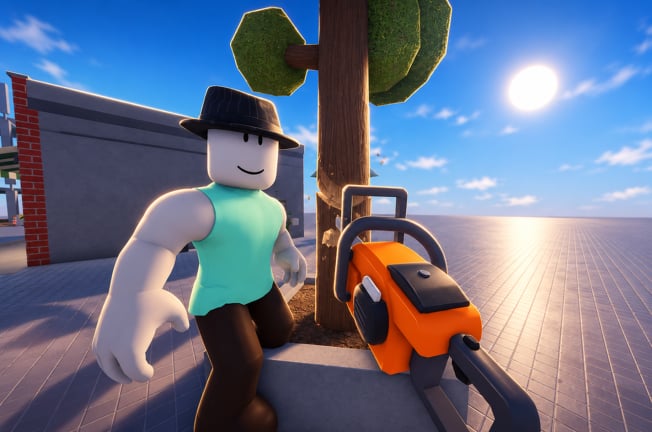
Welcome to the guides hub for Ragdoll Destruction Playground, the Roblox physics sandbox by Harpax Dev. This is the destruction-focused experience where you wreck the world with intelligent ragdolls, toys like the minigun and chainsaw, explosives, fire, props, and unlockables — then reset the map and do it again. It is not the separate 2D Ragdoll Playground titles. Use these pages to learn the intended single-player loop while the game is early in development and multiplayer is still planned.
Start here if you want structured help instead of random button mashing. Each guide below is written for real session flow: orient, experiment, watch the physics, reset, repeat.
Core guides
Getting Started
Your first-session checklist. Join the place, learn the HUD, try a ranged and melee tool, taste slow motion, reset the map, and adopt an unlockables mindset without rushing. Featured for new players who need a safe on-ramp before deeper mechanic pages.
Controls
Honest control guidance for desktop and mobile. Official key sheets are not always published for this early sandbox, so the page teaches the verbs you need — move, aim, fire, grab when available, slow motion, map reset — and tells you to verify binds in the in-game UI after every patch.
Weapons and Explosives
Practical breakdown of the minigun, chainsaw, explosives, fire, and props, plus readable combo ideas. Learn one tool at a time, then stack interactions without turning the map into unreadable noise. For opinionated rankings, continue to the Weapons Tier List after you have practiced the recipes.
Slow Motion
How and why to time-scale cinematic moments. Use slow motion for detonations, chainsaw finishes, and fire spread — not for the entire walk across the map. This guide embeds the verified showcase video for slow motion, explosives, and fire.
Map Reset
Why the official description tells you to reset when you are ready for more destruction. Covers props cleanup, when to wipe the scene, and a block-based session flow that keeps experiments sharp.
Unlockables and NPCs
Lab mindset for new tray items and reactive ragdolls. Fair A/B tests after a clean reset, mild-to-loud NPC stimulus protocols, and a real-session video reference so you evaluate unlocks instead of dumping everything at once.
Destruction Combos
Choreographed set pieces: minigun setup into explosives, slow-motion bloom, chainsaw finish, fire second act, and prop cascades. Built for highlight clips that stay readable on camera.
How to use this hub
- New to the game? Open Getting Started, then Controls.
- Ready to stage wrecks? Study Weapons and Explosives and Slow Motion.
- Scenes feeling clogged? Live inside Map Reset until the habit sticks.
- New tray toys or odd NPC reactions? Run Unlockables and NPCs, then graduate to Destruction Combos.
- Between sessions, skim Updates, the Minigun + Chainsaw Update, and the Early Access Roadmap; check Codes for redeemable rewards; open Scripts only if you knowingly want third-party tools.
- For people and community context, see Players and Player Feedback. Official destinations sit on Links, including Official Channels and Game Passes and VIP. Rank favorites on the Tier List Hub or jump straight to Weapons Tier List.
What good practice looks like
Ragdoll Destruction Playground rewards curiosity with structure. Pick one question per take — “How does fire spread after one explosive?” or “How does a ragdoll react to chainsaw pressure under slow motion?” — then reset and ask a new question. That approach beats dumping every unlockable into one pile and hoping something funny happens.
Because servers are single-player today, you can reset freely without negotiating with teammates. When multiplayer arrives, revisit these guides: shared sandboxes change reset etiquette even if the weapons feel familiar.
A simple weekly loop keeps skills sharp:
- One session focused on controls and clean resets
- One session focused on a single weapon family
- One session focused on cinematic slow-motion takes or full combos
- One session focused on unlockable or NPC lab tests
- A quick skim of patch notes after any arsenal drop
Keep the wiki honest
Features move quickly in early access. If a HUD label, unlock path, or tool behaviour changes, trust the live game and the Updates Hub, then use these guides for principles that still apply: clean setups, deliberate climaxes, and frequent resets. Favorite the official experience so you catch Harpax Dev patches early.
Browse the seven guides above whenever you need a refresher. The playground stays fun when every wreck starts from a clear stage and ends with a reset that invites the next idea.
Frequently Asked Questions
Quick answers to the most common questions.
Which guide should I read first?
Start with Getting Started, then Controls. Move to Weapons and Explosives, Slow Motion, and Map Reset once you can join and reset confidently, then Unlockables and Destruction Combos.
Is this the 2D Ragdoll Playground wiki?
No. These guides cover Ragdoll Destruction Playground by Harpax Dev only.
Where are the guide videos?
Slow Motion embeds the explosives/fire showcase; Unlockables and Destruction Combos each embed a different verified session video. One video per page.
Do you cover codes and scripts here?
Only with outbound links. Use the Codes Hub and Scripts Hub for those topics so guides stay focused on gameplay.
How often are guides updated?
After major sandbox patches that change tools, UI, or session flow. Check the Updates Hub, Minigun + Chainsaw Update, and Early Access Roadmap alongside these guides.